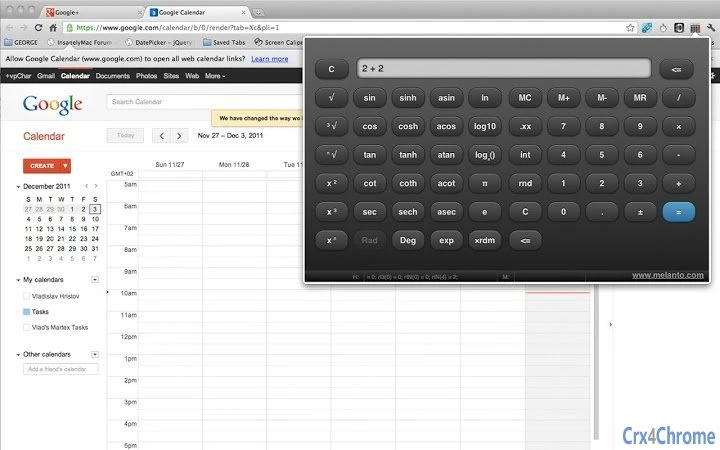

Unique Dual-Side Scientific Calculator
Overview
The software presents a distinctive approach to scientific calculation by displaying both operands of a binary operation simultaneously. This design enables users to see the full expression—such as "2 + 2"—in real time until the result is confirmed. This transparency enhances clarity during complex calculations, reducing input errors and improving workflow accuracy. The tool is particularly useful for students, engineers, and educators who rely on precise, step-by-step computation. Its development originated as a practical demonstration of jQuery Mobile, indicating a focus on web-based functionality and cross-platform adaptability. The calculator supports both keyboard input and touch interaction, making it suitable for use on desktops, tablets, and netbooks. The dual version availability—offering both a browser extension and a standalone app—provides flexibility in how users integrate it into their daily tasks. While the developer has not specified a detailed target audience beyond general use, its intuitive interface suggests broad accessibility. Real-world applications include academic problem-solving, engineering estimations, and classroom demonstrations where visual clarity is essential.
Key Features & Capabilities
- Real-time expression display – Shows both left and right operands of a binary operation simultaneously, allowing users to verify the full equation before execution.
- Unary operation targeting – When a unary function like square root or squaring is applied, it operates on the right operand of the current expression, ensuring predictable results.
- Keyboard and touch support – Compatible with standard number keys, decimal points, arithmetic operators, Enter, ESC (Clear), and Backspace for efficient input.
- Two deployment options – Available as a browser extension and a standalone app, allowing users to choose their preferred access method.
- Future-ready design – Built using jQuery Mobile, the software is structured to support upcoming enhancements, including expanded keyboard shortcuts for scientific functions.
These features support workflows where precision and visibility are critical. For example, a student solving a multi-step algebra problem can visually track each operation. An engineer verifying a formula can ensure that the correct value is being modified by a unary function. The dual interface model allows users to place the calculator at their fingertips via browser toolbar or open it in a dedicated window, depending on their task environment. The developer encourages feedback, suggesting a community-driven development path that may lead to new features based on user needs.
User Interface, Workflow & Performance
The interface is clean and minimal, designed to prioritize function over visual complexity. Navigation is straightforward, with clearly labeled buttons for basic arithmetic and scientific operations. The layout adapts to different screen sizes, supporting use on desktops, tablets, and netbooks. Users can input expressions using either keyboard or touch, with immediate visual feedback. The workflow emphasizes clarity: expressions are displayed in full until confirmed, reducing ambiguity during calculations. While the developer did not specify resource usage details, the 1.5 MB file size suggests lightweight operation. Performance observations are based on general software behavior patterns. The application runs within a browser environment, which may affect responsiveness depending on the system’s browser performance. Stability appears consistent with web-based tools of this nature. No reported crashes or freezes were mentioned. The software is designed to be responsive and maintainable across devices, though actual performance may vary based on underlying hardware and browser conditions.
Compatibility & System Requirements
The software is compatible with Windows and Mac operating systems. It is available in two forms: a browser extension and a standalone desktop application. The installation size is 1.5 MB, indicating a compact footprint. The developer did not specify exact system requirements, such as minimum RAM, CPU, or browser version. Compatibility information was partially provided, with no details on supported browser versions or hardware specifications. The software runs in a browser environment, which may influence performance on older or less powerful systems. Platform compatibility is limited to desktop platforms, with no mention of mobile or tablet-specific optimization beyond general responsiveness. Users should ensure their system supports modern web standards to guarantee full functionality.
Pros and Cons
Pros
- Clear visual display of full expressions during input
- Intuitive handling of unary operations on the right operand
- Available as both a browser extension and standalone app
- Lightweight at only 1.5 MB
- Designed with future improvements in mind
Cons
- Advanced scientific functions lack keyboard shortcuts
- Exact system requirements were not listed
- Performance details not specified
- Only available for Windows and Mac
- No information on update frequency or support channels
FAQ Section
Is this calculator available for both Windows and Mac?
Yes, the software is compatible with both Windows and Mac operating systems.
Can I use this calculator offline?
As a browser-based application, it may function offline if cached properly, but full functionality depends on browser capabilities and prior loading.
Does the software require an internet connection?
While the calculator operates within a browser, it may require a connection for initial loading. Once loaded, limited functionality might be available offline.
What type of license does this software have?
The software is provided as free to use, with no explicit license terms disclosed beyond the "as is" disclaimer.
Can I install both the extension and the standalone version?
Yes, the developer explicitly encourages users to install both versions to determine which best fits their workflow.
Final Thoughts
This unique scientific calculator stands out through its transparent expression display and logical handling of unary operations. Its dual deployment model offers flexibility for users across different work environments. Despite limited information on system requirements and performance, its lightweight design and clean interface make it a reliable tool for students, educators, and technical professionals. The software’s foundation in jQuery Mobile suggests a commitment to maintainability and future updates. While keyboard support for advanced functions is currently limited, planned enhancements indicate ongoing development. For anyone seeking a clear, accurate, and accessible calculator with a focus on visual precision, this tool delivers a compelling experience. Download the latest version today.







